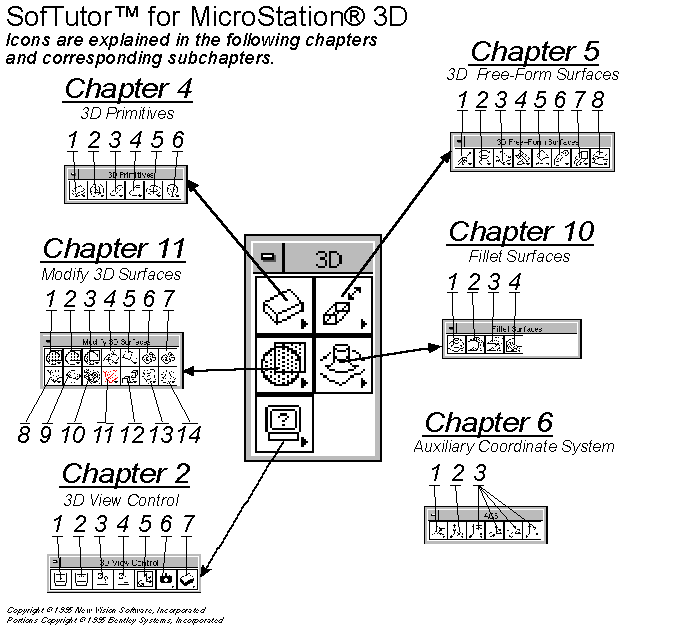
SofTutor for MicroStation 3D will teach you how to use all of the icons used in the creation and manipulation of 3D elements. With over 4 hours of instruction, SofTutor will make you a MicroStation 3D power user in hours not months. There are over 250 topics are indexed for quick reference too!
1.  Basic 3D Concepts
        1.1  MicroStation Basics
	1.2  Menus
	1.3  Creating a 3D Design File
	1.4  The Design Cube
	1.5  Converting a 2D File to 3D File
	1.6  Controlling The X,Y,Z Axis
	1.7  Defining Working Units
	1.8  Element Attributes
	1.9  Main Tool Palette

2  3D View Control
	2.1  Show Display Depth
	2.2  Set Display Depth
	2.3  Show Active Depth
	2.4  Set Active Depth Graphically
	2.5  Change View Rotation
	2.6  Camera Set-up
	2.7  Shade Commands
	2.8  Dynamic 3D Viewing (MDL)
	2.9  Overview (MDL)

3  3D Coordinates & Tentative Points

	3.1  Coordinates in 2D and 3D Design Files
		3.1.1  Coordinates DL Keyin
		3.1.2  Coordinates DX Keyin
		3.1.3  Coordinates XY Keyin Part 1
		3.1.4  Coordinates XY Keyin Part 2

	3.2  Tentative Point Mode
		3.2.1  Tentative Point Command
		3.2.2  TP Mode, Distance
		3.2.3  TP Mode, Delta

	3.3  Setting Locks

4  3D Primitives (Elements)
	4.1  Place Slab
	4.2  Place Sphere
	4.3  Place Cylinder
	4.4  Place Cone
	4.5  Place Torus
	4.6  Place Wedge

5  3D Free-Form Surfaces
	5.1  Construct Surface or Solid of Projection
	5.2  Construct Surface or Solid of Revolution
	5.3  Place Free Form Surface
	5.4  Construct Surface by Section or Network
	5.5  Construct Surface by Edge
	5.6  Construct Tubular Surface
	5.7  Construct Skin Surface
	5.8  Construct Offset Surface

6  Auxiliary Coordinate System
	6.1  Define ACS (Aligned w Element)
	6.2  Define ACS (By Points)
	6.3  Define ACS (Aligned with View)
	6.4  Coordinate Values
	6.5  Settings -> Auxiliary Coordinates

7  Rendering Images
	7.1  Rendering Commands
	7.2  Global Lighting
	7.3  Light Color
	7.4  Source Lighting
	7.5  Assign Materials to Objects
	7.6  Define Materials
	7.7  Render Tool

8  Additional Tools
	8.1  Capture Image
	8.2  Display Image
	8.3  Function Key Menu

9  Detail Sheet Commands
	9.1  Drawing Composition
	9.2  Create a Cross Section

10  Fillet Surfaces
	10.1  Construct Fillet Between Surfaces
	10.2  Creating Chamfers
	10.3  Blending Surfaces
	10.4  Blend Surfaces Between Rail Curves

11  Modify 3D Surfaces
	11.1  Union Between Surfaces
	11.2  Intersection Between Surface
	11.3  Differences Between Surfaces
	11.4  Trim Surfaces
	11.5  Extend Surface
	11.6  Split Surface
	11.7  Stitch Surface
	11.8  Change Surface Settings
	11.9  Change Surface Normal
	11.10  Change Surface Boundary
	11.11  Delete Surface Boundary
	11.12  Change Active Solid or Surface Status
	11.13  Punch Surface Region
	11.14  Extrude Surface Region

12  MDL Commands
	12.1  MDL Magnifier
	12.2  MDL Level Use
	12.3  MDL View Control

13  Labs
	13.1  Lab 1: Two-Dimensional Profiles

	13.2  Lab 2: View Control Commands

	13.3  Lab3: Change Surface Normal

	13.4  Lab 4: Construct a Mechanical Part

	13.5  Lab 5: Creating a Desk
   	        13.5.1  Changing Background Color
		13.5.2  Setting Working Units
		13.5.3  3D Palettes
		13.5.4  Creating a Table Top
		13.5.5  Creating a Desk Leg
		13.5.6  Defining 3D Space
		13.5.7  Create a Drawer
		13.5.8  Mirroring Elements to Create a Desk

	13.6  Lab 6: Creating an Office
		13.6.1  Convert 2D File Into 3D File
		13.6.2  Convert 2D Element into 3D Element
		13.6.3  Grouping Elements with Flood Command
		13.6.4  Select Elements Using Maximum Gap
		13.6.5  Create a Window
		13.6.6  Global Lighting
		13.6.7  Assign Materials
		13.6.8  Fly Through
 |
||||||||
 |
||||||||
| Return to MicroStation Products Page | Return to NVSI Home Page | |||||||
| New Vision Software does not grant permission to any party to redistribute any material without the written consent of New Vision Software, Incorporated. Copyright © 1995-2002 New Vision Software, Incorporated All Rights Reserved. | ||||||||