|
|
|
|
|
|
|
|
|
|
|
|
|
|
|
|
|
|
|
|
|
|
|
|
|
|
|
|
|
|
SofTutor Demos
Disclaimer (READ FIRST)
These are samples from SofTutor products. One thing to keep in mind is that the examples below in blue were originally designed to play at 640x480 resolution, we compressed the videos to reduce their size to play back at 320x240 resolution and as a result the text may appear a little fuzzy*. Actual SofTutor products will be sharp when played on your PC.
*Note: compressing these demos makes them easier and faster to download at the cost of lower resolution, making the text appear blury. By compressing files these they play great over a dial up modem. |
|
|
|
|
|
|
|
|
|
|
|
|
|
|
|
|
|
|
|
SofTutor® On-line - Quicktime® Streaming demos |
|
|
|
|
|
|
These test files are similar to the files that we will use with our upcomming SofTutor for the Web product line. We will continue to provide SofTutor in CD/ROM, LAN,WAN, Custom CD/ROM, Intranet and Internet formats. |
|
|
|
For QuickTime examples click on the following: AutoCAD, MicroStation, SmartSketch, Win 98, IDEAS 6A & IronCAD. |
|
|
Streaming Demo files - Running in Popup windows
Note: these are progressive download files which means you should wait about 15 seconds before you start playing the files. Future SofTutor products will run from a streaming server. A 56Kb modem and Quicktime plugin v 3.0 or better. Play this first to see if you have the quicktime plugin otherwise visit. http://www.apple.com/quicktime/download |
|
|
|
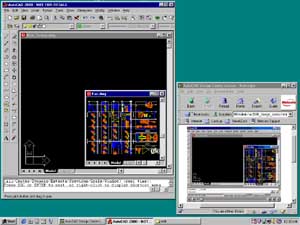
If you have the program that is being taught you can follow along. Resize this window and place it in the lower right hand corner of your screen. Run the program and resize it so that it is in the upper left hand corner. Make sure that the program and your browser or popup windows don't over lap, you'll probably need a 17" monitor at 1024x768 or higher resolution. Open up the sample files (if provided) in the program, then play this video and follow along. |
|
|
|
Application being taught. |
|
 |
|
|
|
|
|
|
|
|
|
|
Browser or popup window. |
|
|
|
|
New Vision Software does not grant permission to any party to download and save or redistribute any material with out the written consent of New Vision Software, Incorporated. |
|
|
|
|
Getting Started in SofTutor - 56Kb examples in blue 320x240 resolution & 120Kb examples in green 640x480 resolution. |
|
|
|
|
SofTutor® Example Files - User Interface Side by Side Functionality Example files |
|
|
|
|
Increasing your Productivity with SofTutor's Quick Search Feature - Short on Time |
|
|
|
|
Follow Along Examples from Commercial SofTutor Products |
|
|
|
|
AutoCAD® |
|
|
|
|
|
|
|
|
|
|
SofTutor for AutoCAD 2000, 2000i & 2002 - Chapter 2.4 - Design Center
Follow Along Example File - New_factory.dwg fac.dwg |
|
|
|
|
SofTutor for AutoCAD 3D - Chapter 5.3.1 - Converting a 2D Floor Plan to a 3D Floor Plan
Follow Along Example File - bank1.dwg |
|
|
|
|
MicroStation® |
|
|
|
|
|
|
|
|
|
MicroStation J 2D - Chapter 7.7 - Intellitrim
Follow Along Example File - intellitrim.dgn |
|
|
|
|
MicroStation J 3D - Chapter 19.1 - Creating a Lamp
Follow Along Example File - lamp.dgn |
|
|
|
|
MicroStation SE Update - Chapter 5.1 - HTML Authoring
Follow Along Example File - dknob.dgn |
|
|
|
|
The following examples do not have follow along example files: |
|
|
|
|
SmartSketch® - This product is not commercially available. |
|
|
|
|
SmartSketch Intro Basics Double Line Symbol Placement Reports Sketching ISDN Sketch |
|
|
|
|
Examples from Custom Projects - Note: the following are not commercially available.
These were created for LAN license customers. If your interested in training 50 users or more please contact us for a custom project quote. You may also be interested in our Web Partner Program. |
|
|
|
|
Windows® 98 Examples Starting Explorer Using Explorer Customizing Explorer |
|
|
|
|
SDRC Ideas® Master Series 6A Lab 1 Step 1 2 3 4 5 6 7 ISDN example |
|
|
|
|
IronCAD® - Intro Toolbars Triball Basics Triball Feature Modification |
|
|
|
|
 |
|
|
|
|
|
|
|
|
|
|
|
|
|
Return to NVSI Home Page |
|
|
|
|
|
|
|
|
|
Copyright © 1995-2001 New Vision Software, Incorporated
All Rights Reserved. SofTutor is a registered trademark of New Vision Software, Incorporated. Other trademarks are the property of their respective holders. |
|
|